.png?width=1286&height=255&name=logo-raspberry%20(1).png)
Overview
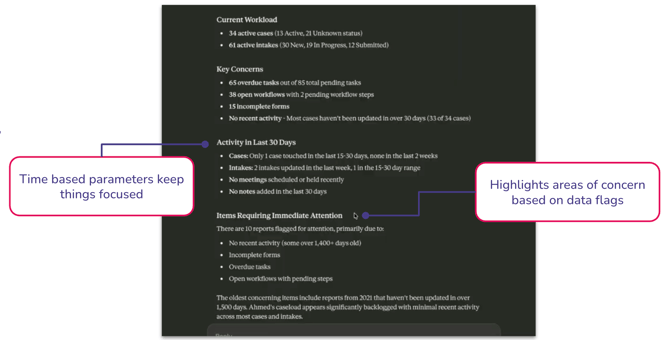
This pilot introduces a read-only Model Context Protocol (MCP) connection between your AI assistant and Casebook. Supervisors and backup staff can ask their AI assistant for quick situational overviews of a worker's caseload or an individual case, reducing the time spent navigating multiple areas of Casebook under time pressure.
Example prompts: "Give me a high-level overview of Jamie's caseload right now." or “What should I be worried about with Jamie’s caseload right now?”
Who this is for
This pilot is designed for two primary scenarios:
- Supervisors who need fast situational awareness before check-ins
- Backup or coverage staff who need to quickly understand an unfamiliar caseload
What's included in this pilot
| What it can do | What it cannot do |
| ✅ Read case records and caseload data | ❌ Create, update, or delete any records |
| ✅ Generate AI summaries for coverage and check-ins | ❌ Perform bulk actions of any kind |
| ✅ Operate within its own defined role-based permissions | ❌ Access data beyond your Casebook permissions |
How to request access
The MCP pilot is currently in alpha. Access is granted on a request basis using the form below. Once approved, you'll receive setup instructions via email.
Prerequisites
Before you begin, make sure you have:
-
An active Claude.ai account (Pro, Team, or Enterprise)
-
Access to your organization's Casebook environment
-
Your Casebook login credentials
-
Admin access to create the Integration User
How Your Data is Handled with Integrations
Casebook secures your data while it is stored within the platform. When you create an integration data may be transmitted to external systems that are not managed by Casebook. You are responsible for ensuring that any third-party tools you connect meet your organization’s security and compliance requirements, including those related to sensitive data. Casebook does not control or guarantee the security practices of external systems.
Frequently asked questions
Does this change my permissions in Casebook?
The MCP connection has its own set of permissions, think of it as a separate account that's been granted specific access to Casebook. This is different from what you personally can see and do in Casebook. So even if your account has access to certain records, the MCP connection only sees what it's been given permission to see, not more.
Which AI assistants are supported?
For now, this alpha is Claude-only. Setup instructions will walk you through connecting Claude once your access is approved.
Can the AI make changes to Casebook on my behalf?
No. This pilot is strictly read-only. No create, update, delete, or bulk operations are available through the MCP connection.
What feedback is expected from pilot participants?
Participants may be asked to share feedback on summary accuracy, access patterns, and overall usefulness for supervisor and coverage workflows.